How to use NotebookLM for Stock Research?
When it comes to doing stock market research, there’s a valuable tool I’ve discovered: Google’s NotebookLM. Why is it an awesome tool? Well, there are two main reasons. First, it can read thousands of pages in just seconds. Second, it creates a closed loop, i.e. the AI can only use the specific documents or links you provide it, ensuring the information you get is verified and accurate. This is super important for stock research because you need reliable, accurate data, not random, unverified information from the internet.
If you’re a visual learner (like me) and would rather watch how this all works, check out the video (20 mins) this article is based on. It shows you the entire process step by step, from uploading documents to getting the AI to work for you.
Getting Started: Uploading Documents and Defining Your Research Scope
The first thing I do is gather all the documents I need for the company I’m researching. For this example, I’m looking at an ASX listed racing technology company called Racing and Sports Technology Holdings (ASX:RTH). I downloaded their annual reports, announcements, presentations, and even the company’s prospectus. I saved them all in a folder and then uploaded them to NotebookLM by creating a new notebook. The more information I provide, the better the results will be. Notebook LLM is free to use, which is a big plus.
After uploading, NotebookLM quickly absorbs the information. I was really impressed by how fast it can read large documents, even those that are 500 to 700 pages long. Once it’s done, a check mark appears, confirming the information has been absorbed.
I can also add other sources, like the company’s website, YouTube videos, or independent text. This flexibility in defining the source material is a key feature of the closed-loop system, guaranteeing the AI only draws from the information I’ve provided. This helps me avoid unreliable or inaccurate information from random places on the internet.
The ‘Kill Off My Stock Idea’ Checklist: Looking for Problems First
When you’re doing stock research, your first instinct might be to ask the AI for an investment thesis. However, it’s even better to kill off your idea within the first hour of research. This saves you time and allows you to move on to better opportunities if the initial red flags are too significant.
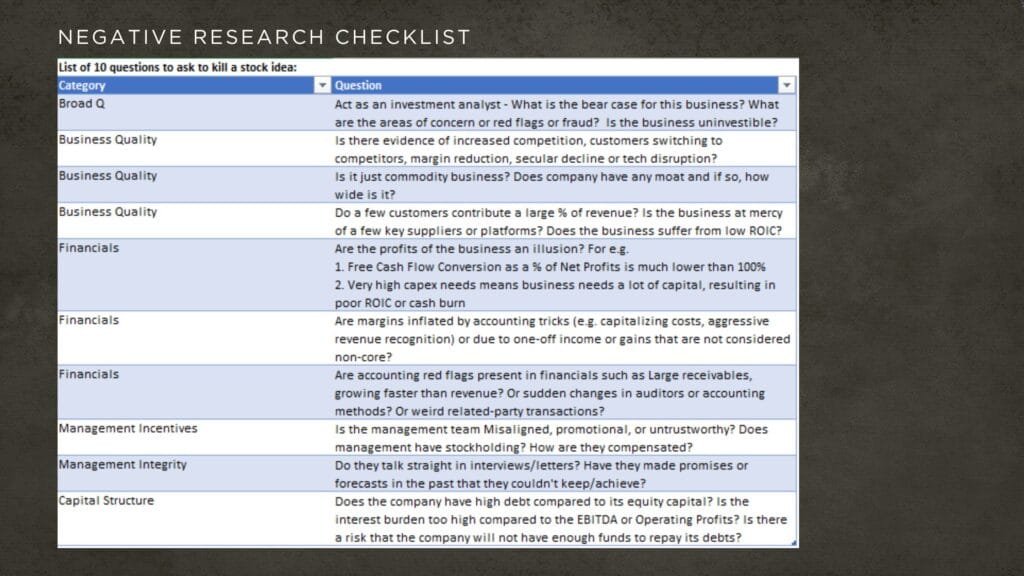
To do this, I’ve created a checklist of about 10 checkpoints with AI prompts. I call it ‘Negative Research’. My first prompt to NotebookLLM is to “act as an investment analyst” and give me the bear case. since I want to know all the bad news first, such as accounting issues, red flags or dishonest management. The exact prompt is as follows:
Act as an investment analyst – What is the bear case for this business? What are the areas of concern or red flags or fraud? Is the business uninvestible?
This helps me quickly decide if I want to continue looking into the business.
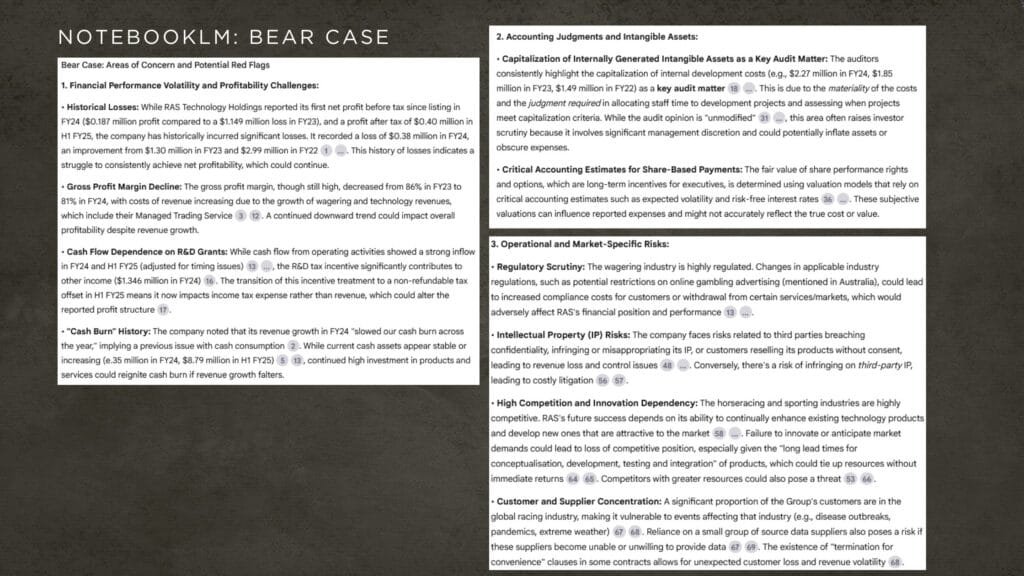
For the racing technology company I’m analyzing, the AI highlighted several issues. For context, RTH It’s a software and services provider for racing companies, helping with things like managing back-end data for betting odds. The problems identified included:
- Cash burn: The company is obviously running at a loss
- Accounting issues: The AI flagged that internally generated intangible assets was a “key audit matter” and noted that the company appears to be capitalizing some expenses. This is something I’ll need to dig into further.
- Competition: NotebookLM highlighted that the horseracing and sporting industries are highly competitive. RTH’s future success depends on its ability to continually enhance existing technology products and develop new ones that are attractive to the market
- Customer and supplier concentration: The company works with big players in the betting industry, which creates a concentration risk.
Here’s a snippet of NotebookLM’s full answer:
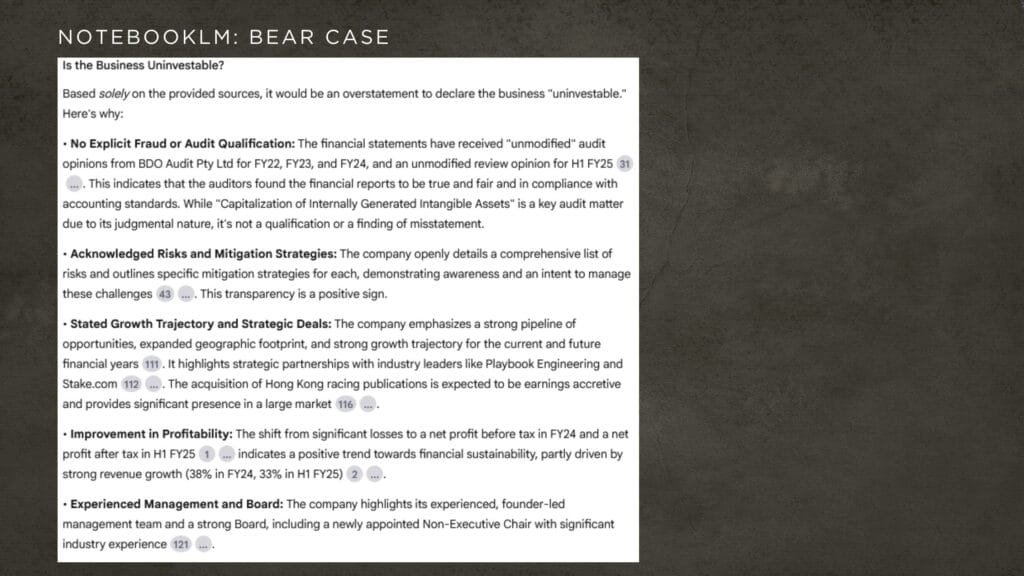
Despite these issues, the AI didn’t declare the business uninvestable. It said it would be an “overstatement” to do so because it found no explicit fraud or major red flags.
Deep Dive: Probing Specific Risks
After the initial overview, I used other prompts to dig deeper into the identified risks. I have a checklist of 10 prompts that help me probe for issues like accounting irregularities, mismanagement, or market dynamics. If you’re interested in this checklist, you can download it for free below.
Competition and Customer Churn
My second prompt asks about competition. I wanted to know about the chances of customer switching, potential margin reductions, and if there’s any sign of a secular decline. NotebookLM told me the industry is “highly competitive”. It even listed existing competitors, which was helpful.
The company’s documents stated there’s “no experience churn” or “minimal churn,” which is a positive sign and quite reassuring. NotebookLM also noted some margin reduction, but that’s understandable for a growing business. The business is also in a growing market with increased demand, which is good. At this point, I didn’t seeing any crazy red flags, so was tempted to keep going.
It’s important to remember that NotebookLM doesn’t automatically save your prompts and answers like other platforms such as ChatGPT. You have to manually click a “save to note” button to keep the information for later reference.
Concentration Risk
Next, I want to investigate the concentration risk that NotebookLM mentioned earlier. I asked it to provide “year-on-year concentration percentages for each customer”.
Notebook LM confirmed that customers are “contributing significantly” to revenue. The best part about this platform is that I can click on the reference and it takes me to the exact page in the source document where it found the information. This feature is incredibly useful because it gives you very sharp, direct answers while also showing you exactly where to find more context in the original document.
For example, it told me that 48% of the company’s revenues come from four customers. When I asked for the names, it couldn’t provide them, but it gave me a breakdown by financial year and directed me to the exact page and paragraph in the annual report which I could read on the left hand side pane.
Other Awesome Features for Deeper Analysis
Beyond the simple Q&A, NotebookLM has some other powerful features that help with research.
Mind Map
The mind map feature is amazing. When I asked NotebookLM to generate a mind map, it broke down the documents into various categories. I could then drill down into specific areas, like “products and services,” and then further into categories like “digital and media wholesale”.
When I clicked on a specific item, for instance, “digital betting shop displays,” NotebookLM automatically ran a query in the background to provide me with more information about it, including its source. It’s a cool way to understand the different elements of a company and its operations.
Timeline
Another really helpful tool is the timeline feature. By creating a timeline, I got a chronological overview of the company’s history based on the documents I provided. Even though my documents only go back to 2019, it still outlines key achievements, management changes, and other important events, right from the early founding days of the company. This gave me a quick, at-a-glance understanding of the company’s journey. NotebookLM even generates a “cast of characters,” highlighting the key people involved in this journey, which is very neat.
Investigating Accounting Red Flags
I also like to ask a very specific question: “Are the profits an illusion?”. This prompt is designed to check if the company’s net profits are actually converting into cash flow. A business can look profitable on paper, but if it’s not generating enough cash, it might not be a good investment.
For this particular company, the question wasn’t fully applicable since it’s generating losses. But NotebookLM provided a comparison of free cash flow to net profit, showing the free cash flow was slightly higher than the net profit in one year.
I also like to ask about general accounting red flags because they can be difficult to spot by just reading an annual report. My prompt looks for things like:
- Receivables growing faster than revenues.
- Sudden change in auditors.
- Changes in accounting methods.
- Weird third-party transactions.
A Word of Caution: Fact Checking AI-Assisted Research
While NotebookLM is a powerful tool, it’s crucial to understand its limitations and the risks of relying solely on AI for research. The AI’s responses are only as good as the documents you provide it. If a critical piece of information is missing from the uploaded files, the AI will not be able to find it, leading to an incomplete analysis.
The AI’s summarization capabilities, while impressive, can sometimes oversimplify complex issues. It might highlight certain data points, like the growth in receivables, but without providing the full context or the reasons behind the anomaly. Hence we can use the AI’s findings as a starting point but then we need to dig into the details to fully understand the situation. For example, the AI can tell you that an external auditor changed, but if it doesn’t say why the auditor was changed, the information is not complete enough to make decisions . You have to investigate further to determine if the change was due to the company getting bigger or something more concerning.
Lastly, the AI can’t replace your judgment. It presents the “bear case” and points out potential red flags, but the final investment decision should still sit with us. We still have to analyze the information and decide if the risks are acceptable. The AI’s role is to assist, not to decide.
Final Thoughts
I’ve got a comprehensive checklist with 43 prompts that I use to do a deep dive into businesses. I use NotebookLM to quickly get answers on things like management incentives, industry growth rates, and the sustainability of the business. This tool is a game-changer because it allows me to get detailed, verified research in a fraction of the time it would take to read through hundreds of pages myself. It’s an essential part of my research process. You can buy it here if you’re interested.

AI Stock Research Checklist with Prompts
Boost your stock research with this 43-Point AI Stock Research Checklist with built-in prompts. Quickly analyse key factors like business strength, financials, capital allocation, management integrity, and risks to make smarter investment decisions.
Shop Other Products
Warren Buffett Figurine – Limited Edition
Original price was: $599.00.$499.00Current price is: $499.00.Charlie Munger Quotes Canvas Print with Portrait
Original price was: $119.00.$89.00Current price is: $89.00.Peter Lynch Best Quotes Canvas
Original price was: $129.00.$99.00Current price is: $99.00.



Continue Reading
A Beginner’s Guide to Value Investing in the Stock Market

Stay Hungry, Stay Foolish: Transformative Lessons from Steve Jobs

Volatility Is Opportunity
Investing Principles for Aspiring Investors

Peter Lynch’s Investing Philosophy